
Seedance 2.0 Promt Guide
Master Seedance 2.0 - prompt structure, @ tags for character consistency, camera language, and smart settings. From rough draft to cinematic output.
If you’re tired of typing “cinematic woman walking in rain” and getting back a blurry, shape‑shifting mess, you’re in the right place. This guide isn’t for casual tinkerers. It’s for creators who want repeatable, professional results — the kind you can actually use in a client project, a short film, or a social ad.
Let’s break down the exact workflow Seedance 2.0 expects, from how you write prompts to how you control characters, camera moves, and even cost.
Part 1: Prompts Are Not Descriptions — They Are Instructions
Most beginners treat prompts like poetry. Seedance treats them like a shot list. If you want consistent results, you need a rigid structure.
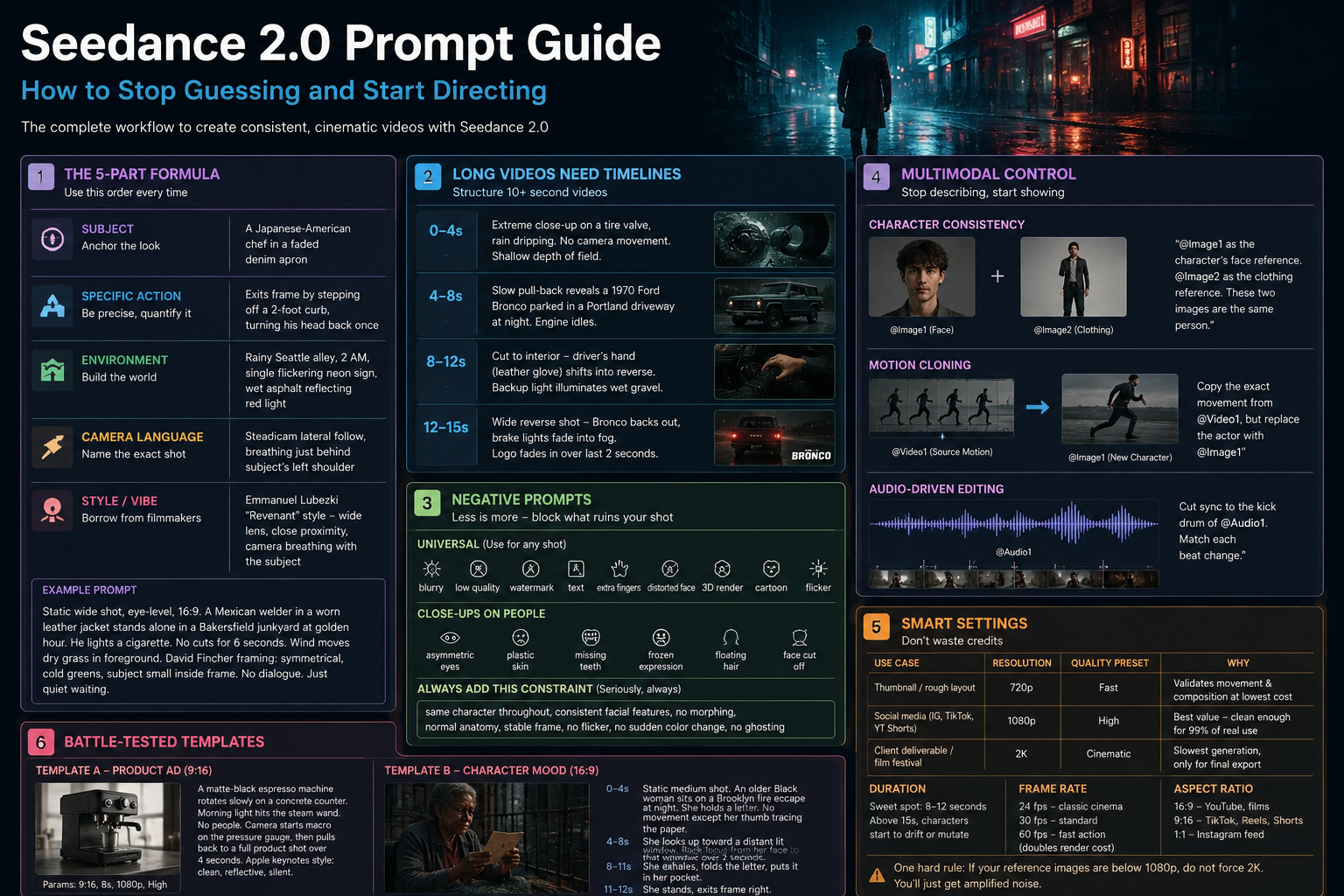
The 5‑Part Formula (Use This Order Every Time)
[Subject] + [Specific Action] + [Environment] + [Camera Language] + [Style / Vibe]
1. Subject — Anchor the Look
Don’t say “a man.” Say:
A Japanese-American chef in a faded denim apron
The @ tag is your secret weapon. To reference an uploaded image, type @ in the prompt box — a dropdown will appear showing your uploaded files as @Image1, @Image2, @Video1, @Audio1, etc. Select the one you want.
You can use up to 9 images, 3 videos, and 3 audio files in one generation — but you cannot mix reference images with first/last frame images.
Pro tip: For characters, use one face close‑up + one full‑body costume shot as separate references. Then write:
“@Image1 as the character’s face reference. @Image2 as the clothing reference. These two images are the same person.”
2. Specific Action — Avoid Vagueness
Bad: walks away
Good: exits frame by stepping off a 2‑foot curb, turning his head back once
Quantify what you can. “Slowly” is okay. “Over 3 seconds” is better.
3. Environment — Build the World
Include lighting, weather, time of day, and key props.
rainy Seattle alley, 2 AM, single flickering neon sign, wet asphalt reflecting red light
4. Camera Language — This Is Where Movie Magic Happens
Name the exact shot type. Don’t say “cool camera move.” Say:
| If you want… | Write this… |
|---|---|
| A walk‑and‑talk | Steadicam lateral follow, breathing just behind subject’s left shoulder |
| Sudden tension | Dolly in over 2 seconds, rack focus from background to eyes |
| A disorienting POV | First‑person, Dutch angle, slight handheld wobble |
| Epic scale | Low‑angle drone push‑in, no cuts for 8 seconds |
You can combine moves: “Handheld + rack focus + slow zoom out” — but only if each serves the emotion.
5. Style / Vibe — Borrow From Real Filmmakers
Generic: dramatic lighting
Better: Emmanuel Lubezki “Revenant” style — wide lens, close proximity, camera breathing with the subject
This instantly tells the model a thousand things about color, contrast, and composition.
A Real Example (American Workflow Mindset)
Static wide shot, eye‑level, 16:9. A Mexican welder in a worn leather jacket stands alone in a Bakersfield junkyard at golden hour. He lights a cigarette. No cuts for 6 seconds. Wind moves dry grass in foreground. David Fincher framing: symmetrical, cold greens, subject small inside frame. No dialogue. Just quiet waiting.
Part 2: Long Videos (10+ Seconds) Need Timelines
If you ask for a 15‑second video without a timeline, the AI will hallucinate. Don’t let it. Use this exact format:
0‑4s: [opening description, camera, action]
4‑8s: [development]
8‑12s: [climax or key action]
12‑15s: [end / logo / fade]
Example – Car commercial vibe:
0‑4s: Extreme close‑up on a tire valve, rain dripping. No camera movement. Shallow depth of field.
4‑8s: Slow pull‑back reveals a 1970 Ford Bronco parked in a Portland driveway at night. Engine idles. License plate blurs.
8‑12s: Cut to interior – driver’s hand (leather glove) shifts into reverse. Backup light illuminates wet gravel.
12‑15s: Wide reverse shot – Bronco backs out, brake lights fade into fog. Logo fades in over last 2 seconds.
Part 3: Negative Prompts — Less Is More
Don’t paste a 100‑word blacklist. Only block the things that ruin your specific shot.
For Any Shot (Universal)
blurry, low quality, watermark, text, extra fingers, distorted face, 3D render, cartoon, flicker
For Close‑Ups on People
asymmetric eyes, plastic skin, missing teeth, frozen expression, floating hair, face cut off
The One Constraint You Should Always Add (Seriously, Always)
At the end of every prompt, add:
same character throughout, consistent facial features, no morphing, normal anatomy, stable frame, no flicker, no sudden color change, no ghosting
This is your safety rope. Without it, Seedance might decide to change your character’s nose halfway through.
Part 4: Multimodal Control — Stop Describing, Start Showing
Text is weak. Images and videos are strong.
How the @ Tag System Actually Works
When you upload files to Seedance 2.0, the system automatically assigns them labels: @Image1, @Image2, @Image3, @Video1, @Audio1, etc., based on upload order.
To reference an asset, type @ in the prompt box — a dropdown appears showing all your available references. Select the one you want.
Important: You cannot create custom names like @face_ref or @costume_ref. The system only recognizes its own numbered labels. However, you can — and should — use natural language to tell the model what each reference is for.
Character Consistency Across Multiple Shots (The Right Way)
- Upload a clear front‑face headshot → becomes
@Image1 - Upload a full‑body clothing reference → becomes
@Image2 - Write your prompt like this:
“@Image1 as the character’s face reference. @Image2 as the clothing reference. These two images are the same person. Use the face from @Image1 and the exact outfit from @Image2. Same character throughout — no face morphing, no clothing changes.”
This works across different scenes, angles, and lighting conditions. Reuse the same reference images for every generation in a series.
Motion Cloning
Have a specific dance, walk cycle, or action you want? Upload a video (it becomes @Video1) and write:
“Copy the exact movement from @Video1, but replace the actor with @Image1”
The model will transfer the motion to your character. This is huge for fight choreography, product spins, or any repeatable physical action.
Audio‑Driven Editing (Underused Power Move)
Upload an MP3 as @Audio1 and write:
“Cut sync to the kick drum of @Audio1. Match each beat change.”
You can also enable Lip Sync in the parameters if you upload dialogue. It’s not perfect for long sentences, but for short lines (“Check this out”) it works surprisingly well.
Part 5: Smart Settings — Don’t Waste Credits
Here’s the cost‑to‑quality reality. Use this table.
| Use Case | Resolution | Quality Preset | Why |
|---|---|---|---|
| Thumbnail / rough layout | 720p | Fast | validates movement and composition at lowest cost |
| Social media (IG, TikTok, YT Shorts) | 1080p | High | best value — clean enough for 99% of real use |
| Client deliverable / film festival | 2K | Cinematic | slowest generation, only for final export |
One hard rule: If your reference images are below 1080p, do not force 2K. You’ll just get amplified noise.
Duration & Frame Rate
- Sweet spot: 8–12 seconds. Above 15 seconds, characters start to drift or mutate.
- 24 fps – classic cinema, natural motion blur
- 30 fps – standard for Reels, TikTok, YouTube
- 60 fps – only for very fast action (parkour, explosions) — doubles render cost
Aspect Ratio Cheat Sheet
16:9– YouTube, client mood reels, film festivals9:16– TikTok, Instagram Reels, YouTube Shorts (default for most creators now)1:1– Instagram feed, product close‑ups
Part 6: Two Battle‑Tested Templates
Template A – Product Ad (Vertical, 9:16)
Prompt:
A matte‑black espresso machine rotates slowly on a concrete counter. Morning light hits the steam wand. No people. Camera starts macro on the pressure gauge, then pulls back to a full product shot over 4 seconds. Apple keynotes style: clean, reflective, silent.
Params: 9:16, 8s, 1080p, High
Template B – Character Mood (Horizontal, 16:9)
Prompt:
0‑4s: Static medium shot. An older Black woman sits on a Brooklyn fire escape at night. She holds a letter. No movement except her thumb tracing the paper.
4‑8s: She looks up toward a distant lit window. Rack focus from her face to that window over 2 seconds.
8‑11s: She exhales, folds the letter, puts it in her pocket. Camera holds on her face for the final second.
Barry Jenkins style: warm skin tones against cool night, shallow depth, no score.
Params: 16:9, 11s, 1080p, Cinematic
Final Professional Habit (Save Your Credits)
Never go straight to final output.
Step 1: Generate at 720p / Fast to check:
- Does the character stay consistent?
- Is the camera move what you meant?
- Does the timing work?
Step 2: Fix the prompt based on what you see. Add constraints. Remove confusion.
Step 3: Regenerate at 1080p or 2K with the exact same prompt.
This turns a credit‑burning guessing game into a repeatable, reliable production workflow.